This property is used when we want to display data dynamically or on-demand. In other words, if the user wants to create a grid with a large (infinite) number of children, then they can use the GridView.builder() constructor with either a SliverGridDelegateWithFixedCrossAxisCount or a SliverGridDelegateWithMaxCrossAxisExtent.
The common attributes of this widget are:
itemCount: It is used to define the amount of data to be displayed.
gridDelegate: It determines the grid or its divider. Its argument should not be null.
itemBuilder: It is used to create items that will be displayed on the grid view. It will be called only when the indices >= zero && indices < itemCount.
Example
Let us understand it with the help of an example. Open the project, navigate to the lib folder, and replace the below code with the main.dart file.
import 'package:flutter/material.dart';

void main() => runApp(MyApp());

class MyApp extends StatelessWidget {

  List<String> images = [
    "https://static.javatpoint.com/tutorial/flutter/images/flutter-logo.png",
    "https://static.javatpoint.com/tutorial/flutter/images/flutter-logo.png",
    "https://static.javatpoint.com/tutorial/flutter/images/flutter-logo.png",
    "https://static.javatpoint.com/tutorial/flutter/images/flutter-logo.png"
  ];

  @override
  Widget build(BuildContext context) {
    return MaterialApp(
      home: Scaffold(
        appBar: AppBar(
          title: Text("Flutter GridView Demo"),
          backgroundColor: Colors.red,
        ),
        body: Container(
            padding: EdgeInsets.all(12.0),
            child: GridView.builder(
              itemCount: images.length,
              gridDelegate: SliverGridDelegateWithFixedCrossAxisCount(
                  crossAxisCount: 2,
                  crossAxisSpacing: 4.0,
                  mainAxisSpacing: 4.0
              ),
              itemBuilder: (BuildContext context, int index){
                return Image.network(images[index]);
              },
            )),
      ),
    );
  }
}
Output
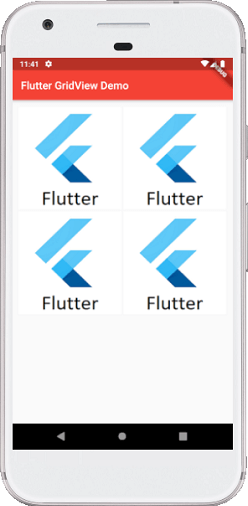
When we run the app in Android Studio, we can see the following screen in our Emulator.