In this section, we are going to learn the concept of a widget, how to create it, and their different types available in the Flutter framework. We have learned earlier that everything in Flutter is a widget.
If you are familiar with React or Vue.js, then it is easy to understand the Flutter.
Whenever you are going to code for building anything in Flutter, it will be inside a widget. The central purpose is to build the app out of widgets. It describes how your app view should look like with their current configuration and state. When you made any alteration in the code, the widget rebuilds its description by calculating the difference of previous and current widget to determine the minimal changes for rendering in UI of the app.
Widgets are nested with each other to build the app. It means the root of your app is itself a widget, and all the way down is a widget also. For example, a widget can display something, can define design, can handle interaction, etc.
The below image is a simple visual representation of the widget tree.
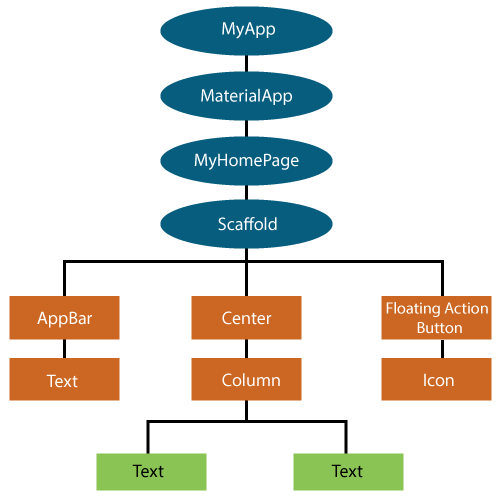
We can create the Flutter widget like this:
Class ImageWidget extends StatelessWidget {
         // Class Stuff
} import 'package:flutter/material.dart';
class MyHomePage extends StatelessWidget {
MyHomePage({Key key, this.title}) : super(key: key);
// This widget is the home page of your application.
final String title;
@override
Widget build(BuildContext context) {
return Scaffold(
appBar: AppBar(
title: Text(this.title),
),
body: Center(
child: Text('Hello World'),
),
);
}
}