This property is used when we want to create a grid with custom extent values. It means each tile has a maximum cross-axis extent.
Example
Let us understand it with the help of an example. Open the project, navigate to the lib folder, and replace the below code with the main.dart file.
import 'package:flutter/material.dart';

void main() => runApp(MyApp());

class MyApp extends StatelessWidget {
  // This widget is the root of your application.
  @override
  Widget build(BuildContext context) {
    return MaterialApp(
      home: MyGridScreen(),
    );
  }
}

class MyGridScreen extends StatefulWidget {
  MyGridScreen({Key key}) : super(key: key);

  @override
  _MyGridScreenState createState() => _MyGridScreenState();
}

class _MyGridScreenState extends State<MyGridScreen> {
  @override
  Widget build(BuildContext context) {
    return Scaffold(
      appBar: AppBar(
        title: Text("Flutter GridView Demo"),
        backgroundColor: Colors.green,
      ),
      body: Center(
          child: GridView.extent(
            primary: false,
            padding: const EdgeInsets.all(16),
            crossAxisSpacing: 10,
            mainAxisSpacing: 10,
            maxCrossAxisExtent: 200.0,
            children: <Widget>[
              Container(
                padding: const EdgeInsets.all(8),
                child: const Text('First', style: TextStyle(fontSize: 20)),
                color: Colors.yellow,
              ),
              Container(
                padding: const EdgeInsets.all(8),
                child: const Text('Second', style: TextStyle(fontSize: 20)),
                color: Colors.blue,
              ),
              Container(
                padding: const EdgeInsets.all(8),
                child: const Text('Third', style: TextStyle(fontSize: 20)),
                color: Colors.blue,
              ),
              Container(
                padding: const EdgeInsets.all(8),
                child: const Text('Four', style: TextStyle(fontSize: 20)),
                color: Colors.yellow,
              ),
              Container(
                padding: const EdgeInsets.all(8),
                child: const Text('Fifth', style: TextStyle(fontSize: 20)),
                color: Colors.yellow,
              ),
              Container(
                padding: const EdgeInsets.all(8),
                child: const Text('Six', style: TextStyle(fontSize: 20)),
                color: Colors.blue,
              ),
            ],
          )),
    );
  }
}
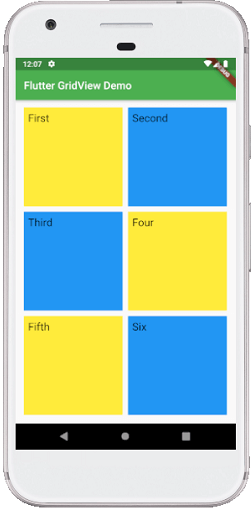
Output
When we run the app in Android Studio, we can see the following screen in our Emulator.